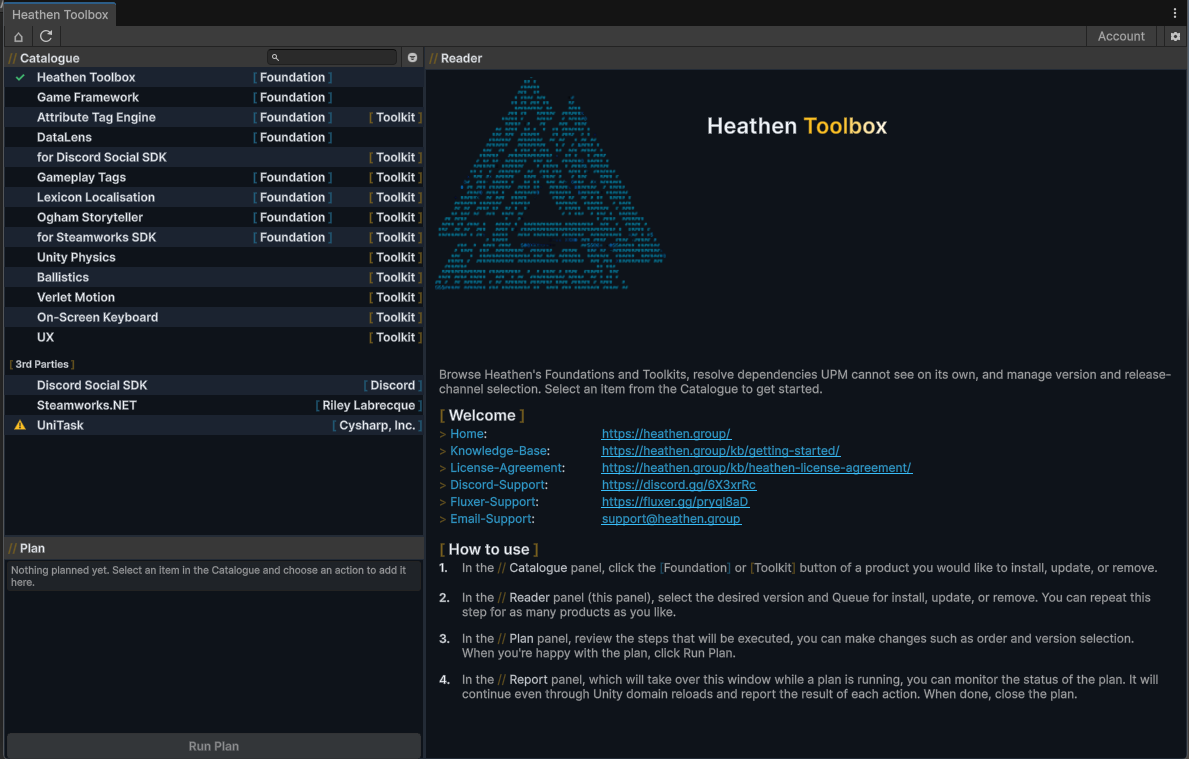
Heathen Toolbox is Heathen’s dependency and version management tool, available now for Unity (Window > Heathen > Toolbox) and Godot (Project > Tools > Heathen > Toolbox), with O3DE and Unreal support coming. It solves one specific problem: the engine’s own package manager (or the lack of one) cannot reason about dependencies between Heathen packages, or between a Heathen package and the third-party SDKs some of them need. Toolbox can.
Why it exists #
A Heathen Toolkit typically needs its own Foundation, which in turn needs Game Framework, and sometimes GameplayTags, DataLens, or Lexicon Localisation Foundation underneath that. UPM’s own manifest resolution has no idea any of this is related; it just installs what you ask for. Before Toolbox, every product carried its own bespoke “install my dependency” prompt: duplicated logic, inconsistent wording, no shared view of the wider graph.
Toolbox replaces all of that with one real dependency graph, one install planner, and one place to review what’s about to happen before it happens. Every Heathen Foundation and Toolkit now bootstraps into it automatically: install any of them into a project that doesn’t have Toolbox yet, and it offers to install Toolbox for you, then queues a plan for whatever that product still needs.
Hard and soft dependencies #
- Requirement (hard). Always installs before whatever needs it. A Toolkit’s Foundation, a Foundation’s own Game Framework/GameplayTags/DataLens dependencies, Steamworks.NET for Foundation for Steamworks: all Requirements. A plan is never complete while one is unmet.
- Optional (soft). Offered, never forced. UniTask for Foundation for Steamworks is a real example: it improves the API, but nothing breaks without it. An unsatisfied Optional edge shows as a mild warning, never a blocking condition, and Toolbox never adds it to a plan on your behalf.
When multiple installed items constrain the same shared dependency to different version ranges, Toolbox resolves the highest version that satisfies every Requirement at once, and flags the rare case where no such version exists clearly, rather than silently picking one side.
Use it as a project readiness check #
Toolbox computes the real dependency graph against whatever’s actually installed. Open it in an existing multi-tool project and it works as a one-shot readiness check: install Toolbox, let it discover everything already in the project, see exactly what’s missing or out of date against the real graph, and Run Plan to bring the whole project current and dependency-complete in a single pass. This works even in a project that already has everything it needs; confirming there’s nothing to do is still useful information.
Cache modes #
Toolbox offers three ways to fetch a package, chosen on first run and changeable anytime from the gear menu:
- Project Cache (recommended). A
3rdParties/folder alongside the project’s own source control root, so the cache travels with the project’s repo. Best for a team wanting reproducible, version-controlled dependencies. - Web (Git URL). UPM’s own native direct-URL mechanism, no local cache folder. A common choice for solo developers who don’t need the cache to be portable.
- Central Cache. One shared cache across every project on the machine. Lower disk usage, not portable via source control. Closer to UPM’s own usual approach, and generally the least recommended of the three for a real project.
Entitlements and Pro Toolkits #
Heathen’s Foundations are free and open source (Apache-2.0). The paid Toolkit tier is entitlement-gated: sign in from the toolbar (device authorization, no password stored locally) to unlock whatever Toolkits your account owns. A plan item that needs entitlement you don’t have shows dimmed with an explanation, and is skipped (never attempted) if you run the plan anyway; everything else in the same plan still completes.
Godot #
Heathen Toolbox is live for Godot: the same catalogue, dependency graph, and entitlement-aware install/uninstall planning, reached from Project > Tools > Heathen > Toolbox. It is a pure GDScript addon (no compiled binary), installed by copying addons/HeathenToolbox/ into your project, or automatically offered the first time you install any Heathen addon that depends on it.
Samples #
Godot has no built-in equivalent of Unity Package Manager’s per-package Samples, so Toolbox provides one. An addon can declare a samples list in its own manifest (a local folder shipped inside the addon, a zip, a git repository, or a direct URL), and Toolbox shows a Samples section under that addon in the Toolbox window with Import/Update and Remove buttons per sample. Importing copies (or fetches and extracts) the sample into res://Samples/<Addon>/<Version>/<Sample Name>/, the same Assets/Samples/<Package>/<Version>/<Sample> convention Unity uses. Re-importing an already-installed sample is a clean replace, the intended way to discard your own edits and get a fresh copy back.
O3DE and Unreal #
Support for both is coming, in a form suited to how each engine already distributes packages rather than a blanket copy of the Unity/Godot experience:
- O3DE will always ship its own Foundations and Toolkits as real Gems first, that does not change. Toolbox’s role is for what a Gem library alone cannot cover: dependencies and content that do not exist as a Gem, and anything gated behind an entitlement a Gem’s own manifest cannot express. As with Godot, it will also handle Samples.
- Unreal Plugins already give you some of what Toolbox does for Unity and Godot. Toolbox’s role there is for dependencies and content that are not pre-packaged as a UE Plugin, plus, again, Samples.
Source and documentation #
Heathen Toolbox is free and open source: Unity-Heathen-Toolbox and Godot-Heathen-Toolbox on Codeberg.