Available for free on Codeberg!
Introduction #
Narrative flexibility and system integration are critical. Traditional dialogue systems often rely on hardcoded scripts or proprietary tools, making it difficult to iterate, localise, or connect storytelling to gameplay mechanics. Ogham Storyteller addresses that.
Ogham Storyteller is a data-driven narrative system that decouples story logic from UI presentation. Using a tag-hash state machine, it supports branching dialogue, persistent world state, conditions, operations, and save/load snapshots, all while integrating seamlessly with Gameplay Tags, Lexicon Localisation, and Script Canvas.
We designed Ogham Storyteller to empower narrative designers and engineers alike. Whether you’re building a visual novel, RPG, or interactive simulation, Ogham provides the tools to create dynamic, reactive stories without sacrificing performance or flexibility.
Core Concept #
Ogham Storyteller is built around two key file types:
| Extension | Role | Contents |
|---|---|---|
.ogmcon | Source | Human-readable JSON, edited in the OghamStoryteller tool. |
.ogmbin | Product | Binary OghamAsset, generated by the Asset Processor. |
At runtime, the system loads .ogmbin files and builds a unified index of all narrative entries and options. This allows for fast, deterministic lookups using XXH3_64bits hashing, the same algorithm used across our Gem suite.
Key Features #
Visual Editor #
The OghamStoryteller Editor is a dockable panel in the O3DE Editor, providing a visual interface for creating and editing .ogmcon files. Features include:
- Tree view of all narrative entries.
- Inline editing of tags, text keys, conditions, and operations.
- Tag validation (with options to add missing tags to
.gptagsfiles). - Localisation preview (shows default culture values).
- File watcher (auto-reloads on external changes).
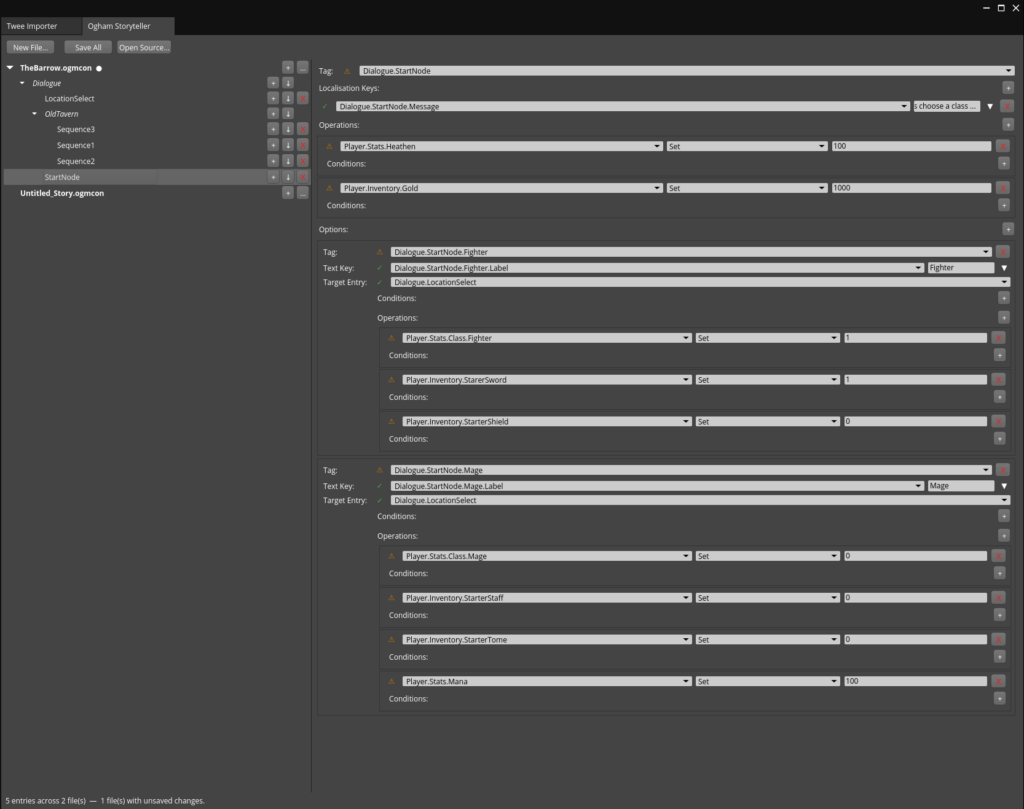
Ogham Storyteller Editor (Example: The OghamStoryteller Editor in O3DE)
Tag-Driven Narrative Logic #
Ogham Storyteller uses Gameplay Tags to define and manage narrative states. Each entry (a node in the dialogue tree) and option (a player choice) is identified by a dot-path tag (e.g., "Act1.Scene1.Line1"). This allows for:
- Hierarchical organisation of narrative content.
- Fast, hash-based lookups (no string comparisons at runtime).
- Seamless integration with other systems (e.g., Gameplay Tags for conditions and operations).
Here we have a start node that is asking the player to choose a “class”. This node on entry will set the player’s health to 100, and depending on what class they choose it will give them equipment and in the case of the mage manna.
Branching Dialogue and Conditions #
Each entry can have multiple options, and each option can:
- Check conditions (e.g.,
"World.PlayerReputation >= 10"). - Apply operations (e.g.,
"Add 5 to World.PlayerReputation"). - Navigate to a new entry (or close the conversation).
This enables complex, reactive narratives where choices matter.
Example:
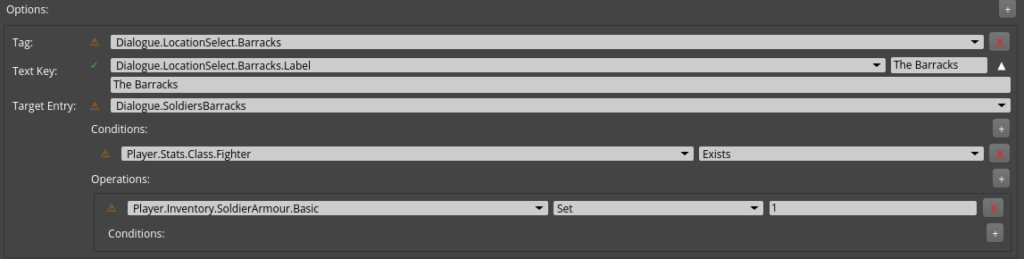
The option below will only display to the player if “Player.Stats.Class.Fighter” exists in the world state data. If you notice from the prior example Fighter was an option, and once selected it set the same fighter tag we see here.
In addition when this option is selected the player will be granted Player.Inventory.SoldierArmour.Basic
Persistent World State #
Ogham Storyteller uses Gameplay Tag Collections to track world state (e.g., reputation, quest progress, inventory). This state persists across conversations and can be saved and loaded using OghamSaveState.
The Ogham Save State tracks
- uuid
A unique ID for this particular session, a new ID is created when a new state is created, loading a state preserves the ID - Name
A simple string name that can be used as a display name for the player - Current Entry Id
The current Dialogue Entry displayed to the player if any - State
A Gameplay Tag Collection representing the “world state” the storyteller system works with - History
A simple linear collection of every Dialogue Entry the player has visited and which option they chose if any
Example:
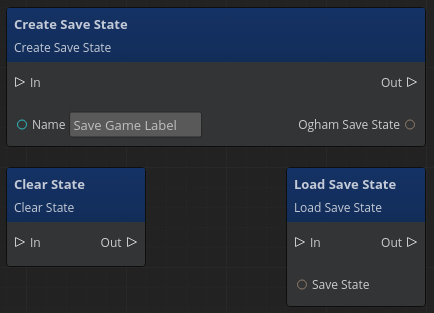
// Create a save snapshot
Heathen::OghamSaveState save;
FoundationOgham::FoundationOghamRequestBus::BroadcastResult(
    save, &FoundationOgham::FoundationOghamRequests::CreateSaveState, "SlotA");

// Restore it later
FoundationOgham::FoundationOghamRequestBus::Broadcast(
    &FoundationOgham::FoundationOghamRequests::LoadSaveState, save);
Twine/Twee Importers (Toolkit) #
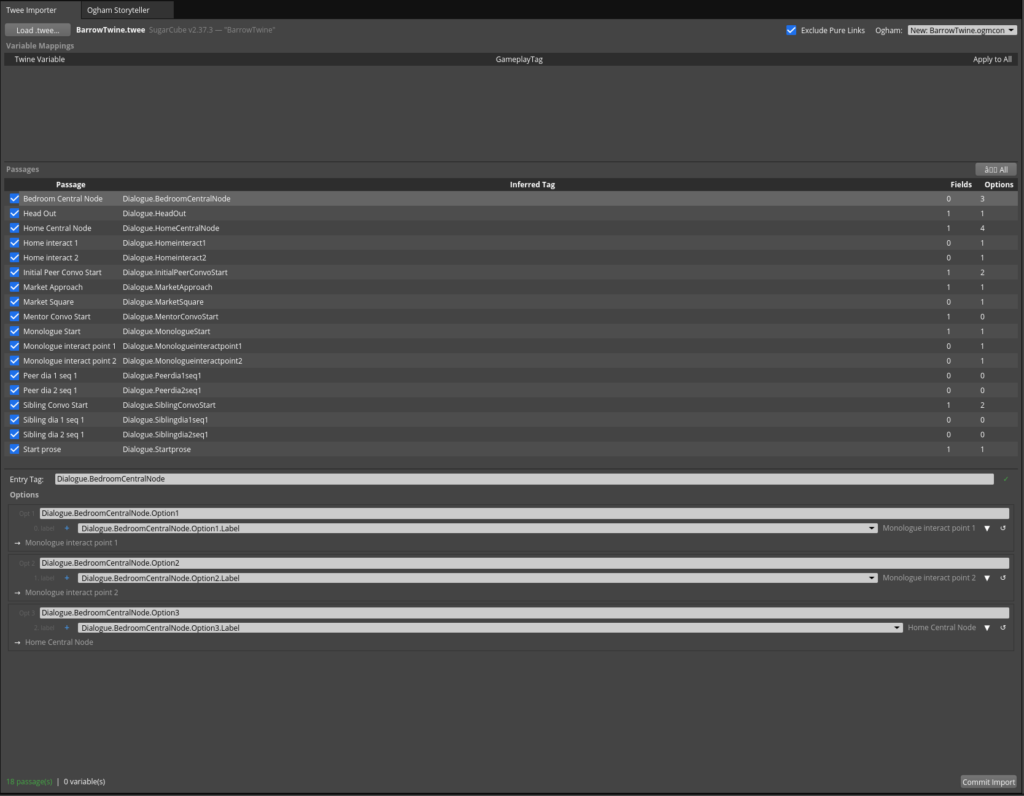
Get Access Now to gain access to the Ogham Storyteller Toolkit (and more), which includes importers for Twine’s Twee 3 files. The Twee Importer currently supports the SugarCube format, with additional formats planned for future updates.
The importer preserves links, variables, and conditional logic, ensuring a smooth transition from Twine to O3DE. It also handles:
- Inline links, which are automatically converted to O3DE’s markup link format for use with the Markup Button UI component.
- Non-inlined “Pure Links”, which are excluded from the displayed text but retained as selectable dialogue options, making it easy to connect them to traditional GUI buttons.
This makes it simple to import, refine, and extend your Twine narratives in O3DE without losing functionality.
Localisation Support #
Ogham integrates with Lexicon Localisation to support multi-language narratives. Each entry and option uses localisation keys (e.g., "Dialogue.Start.Body") that resolve to culture-specific text or assets.