🤖 Agent Prompt

Gameplay Tags is a hierarchical identifier system for managing game state. Rather than scattered booleans, enumerations, and string comparisons, you define a structured vocabulary of named concepts, things like Effects.Debuff.Poison, Player.State.Stunned, or Ability.Active.Sprint and track them in collections that understand how those concepts relate to each other.
A query for Effects.Debuff matches any debuff automatically, conditions let you gate logic on the live state of a collection without writing custom evaluation code, and operations let you mutate that state as authored data rather than bespoke systems.
The whole thing runs on 64-bit integer hashes at runtime so there is no string cost on the hot path, it serialises cleanly, and it supports everything from simple presence flags to stacking numeric values to hierarchy-aware type checks like “is this character’s class a member of the melee family.”
As with all Heathen tools Gameplay Tags is available for multiple engines:



And is composed of two packages:
Foundation
Define, query, and evaluate game state through a high-performance hierarchical tag system with zero runtime string cost. Tags compile from dot-path names to xxHash3 hashes at import.
Ancestry and descendant lookups run in O(1) via pre-built maps, values stack with full arithmetic, conditions chain with AND/OR/XOR logic, and a Burst-safe native snapshot API keeps everything job-friendly.
- License: Apache 2.0
- Price: Free (Godot), (O3DE), (Unity)
Toolkit
Built ontop of Foundation, Toolkit helps you wire hierarchical game-state tags into your scenes and UI without writing code.
Toolkit includes additional tools to help you bind
tag-value changes to events, fire condition triggers from serialised rule sets, and surface live values to labels and sliders — all from the Inspector, no code required. (The filterable tag tree itself lives in Foundation’s own Project Settings panel, not Toolkit — see the Configuration article.)
- License: Heathen Standard
- Price: Get Access Now
Where to Get GameplayTags Toolkit #
Get GameplayTags Toolkit and all of our tools: Get Access Now
All Tools, Yours Forever! #
Get a permanent, perpetual site license to all of our tools for all supported engines.
- One License, Your Whole Team: Our site-based license covers you, your employees, and your contractors. No “per-seat” fees.
- Keep What You Build: If you cancel your subscription, you keep the license to the versions you’ve downloaded. You only need an active subscription for Source Access to our Git server, which has the latest updates, patches, and new features.
- Full Source Access: No DRM, no obfuscation. You get the raw source code (C++, C#, GDScript) to ensure your project’s stability is always in your own hands.
Do More with Heathen’s Foundation for Gameplay Tags #
More than just another tag system.
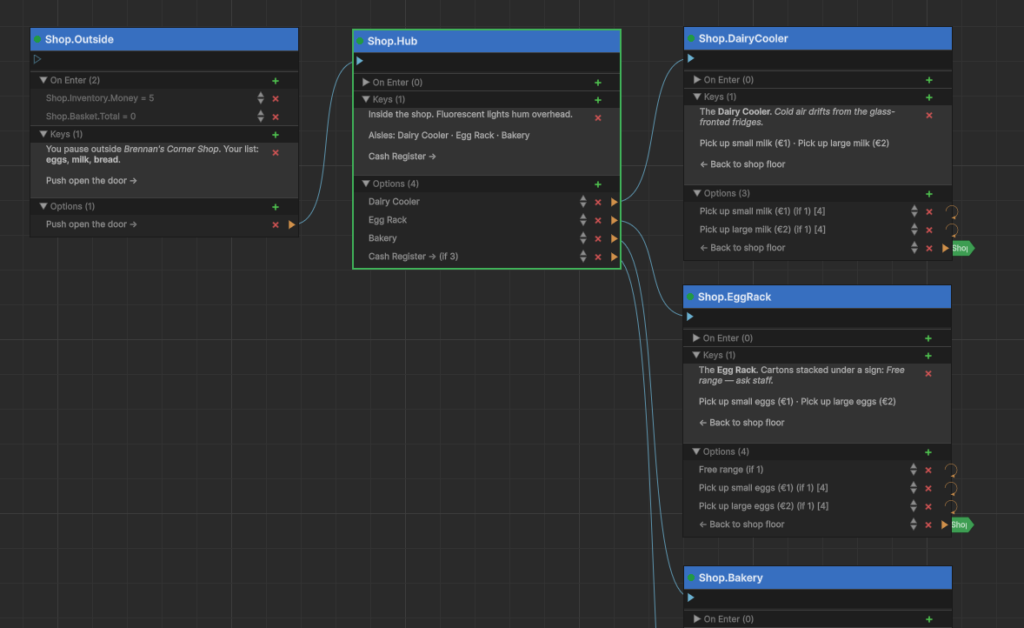
Gameplay Tags is a robust, hierarchy-aware tagging system built for performance and ease of use. Every node, every option, every stat and item can be identified with a human-friendly tag. Tags organise by dot-path and can be searched, set, tested, and have values set.
This knowledge base covers every function and feature of the toolkit, and goes beyond into guides and articles on the practical use of tags in game development.
Key Features #
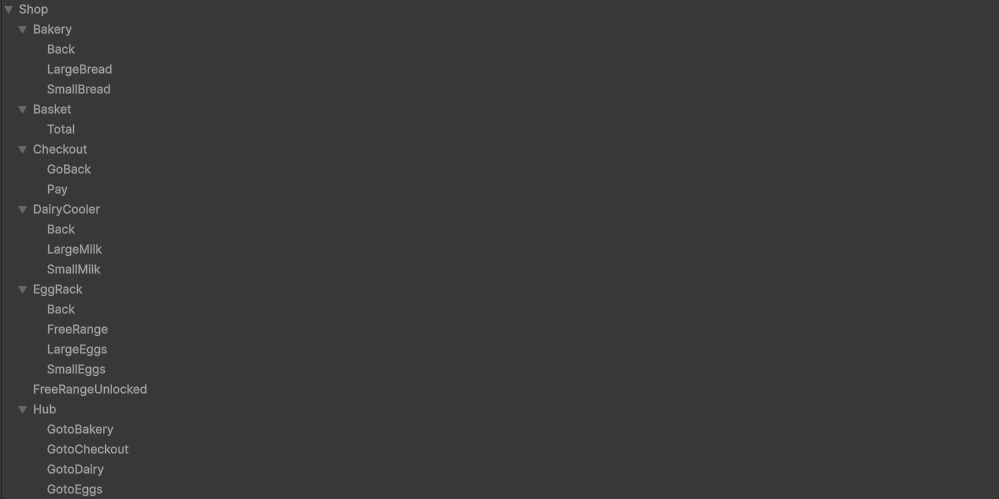
Hierarchical Tag Paths
Tags are defined as dot-separated strings
Effects.Debuff.Poison, Ability.Active.Sprint, Player.State.Stunned.
The hierarchy is not just naming convention; the system understands it. Every segment is a real node, so querying Effects.Debuff can automatically match anything beneath it.
Use this when you want broad queries without enumerating every specific case. A damage system checking for any debuff asks once about Effects.Debuff instead of listing Poison, Slow, Burn, and every future variant you might add.
Tags as More Than Flags
Every tag in a collection carries a numeric value, not just presence or absence. Simple presence tracking uses the default, add a tag and its value is 1, remove it and it’s gone.
But the value can be any number, typed as float, int, long, or double or even another tag.
This can be used for stacking effects (a Poison applied three times has a value of 3), charges (a Spell.Charge tag counting to 5), or any state that needs magnitude alongside identity.
Arithmetic Operations
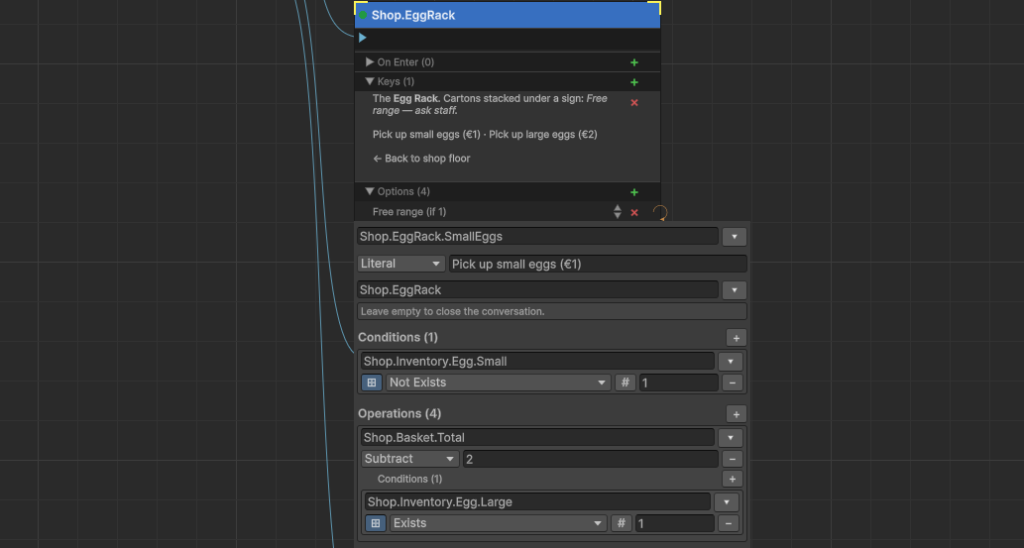
Rather than getting and setting values manually, you apply operations
Set, Add, Subtract, Multiply, Divide, Min, Max.
Operations are data, not code, so they can be authored in the Inspector and triggered from events without writing a single line.
Use this anywhere stacking, capping, or scaling matters: adding armor stacks, draining a resource to a floor of zero with Subtract, capping a buff at a maximum with Min.
Tags as Enumerations
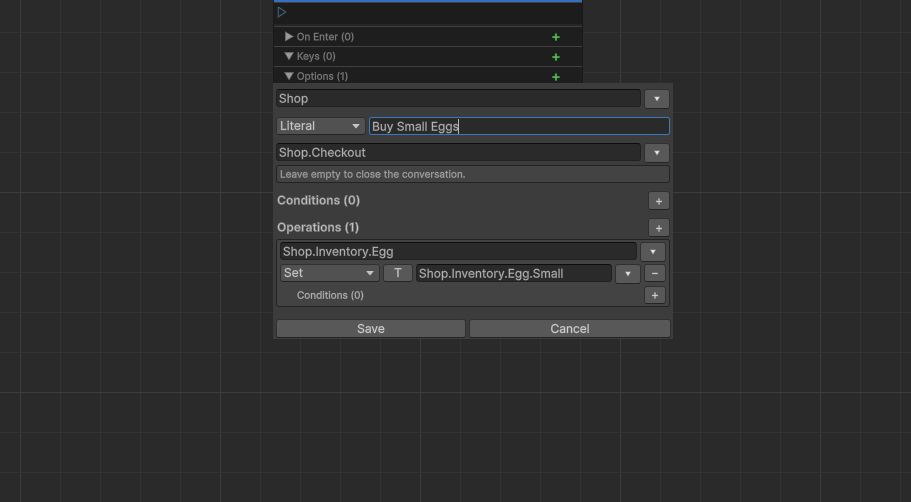
A tag’s value can itself be the hash of another tag path. Set Player.Class to the hash of Classes.Warrior and you have a type-safe, hierarchy-aware enum that works inside the same system as everything else.
Use this to replace string or integer enums for things like character class, elemental affinity, or faction — and gain hierarchy for free. A query for Classes.Melee would match a character whose class is Classes.Melee.Warrior without any extra code.
Hierarchical Queries
The collection query methods Contains, ContainsAll, ContainsAny and ContainsNone all accept an exactMatch flag.
With exact match off (the default), a query on a parent tag matches any descendant present in the collection. With exact match on, only that specific tag qualifies.
Use this to write conditions that stay correct as your tag library grows. An immunity check for Effects.Debuff doesn’t need updating when you add a new debuff type; it catches it automatically.
Condition Expressions
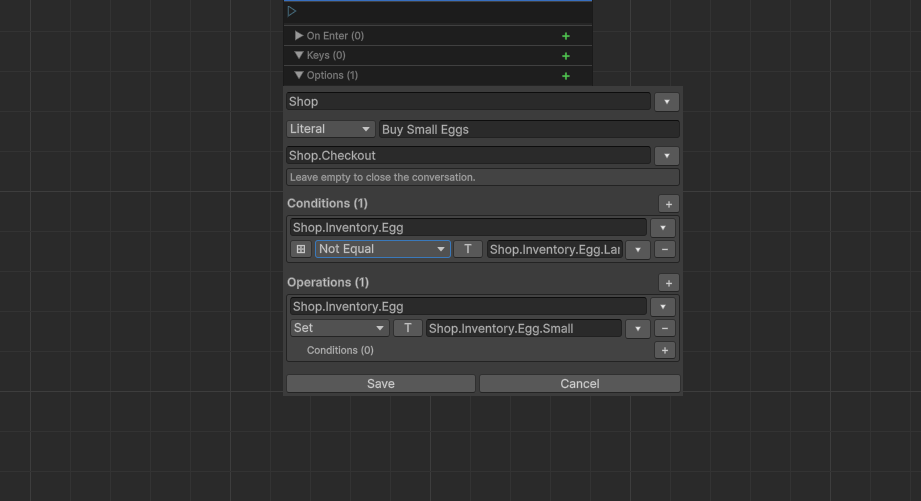
A condition pairs a tag with a comparison operator and a value: Effects.Debuff.Poison Exists, Player.Health Less 25, Ability.Cooldown Equal 0. Conditions evaluate against a live collection, and the right-hand value can itself be another tag’s current value for tag-vs-tag comparisons.
Use this for ability unlock checks, status effect triggers, AI decision conditions, anywhere you need to express “this collection is in this state” as data rather than as bespoke code.
Compound Condition Logic
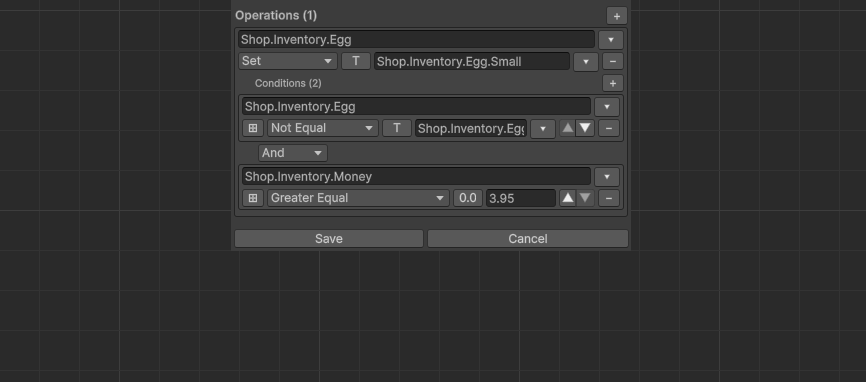
Multiple conditions combine with AND, OR, and XOR operators, evaluated with explicit precedence: AND binds tightest, then OR, then XOR. An empty condition list always evaluates true.
Use this to express complex gate logic in the Inspector “stunned AND (no mana OR silenced)” without writing custom evaluation code. Conditions authored as a list are reusable across any number of triggers, objects, or scenes.
Zero Runtime String Cost
Tags are 8-byte hashes computed at load time from the dot-path strings. At runtime, comparisons, queries, and collection operations work entirely on integers. No string allocations, no dictionary key strings, no garbage.
Use the Foundation package anywhere performance matters — high-frequency update loops, large numbers of entities, jobs and Burst-compiled code all benefit from the flat numeric representation.
Comparison #
GameplayTags vs Unity Tags
Unity’s native tag system is a flat string list. There are no hierarchies, no hierarchy lookups, no numeric values, and no structured query capabilities. Tags are strings with no performance optimisation beyond equality comparison.
GameplayTags provides a proper hierarchical tag system with dot-path organization, O(1) hash-set lookups (highly performant), numeric stack semantics, condition evaluation, and operations stored as data. It is not just a tag system, it is a structured data system for game development.
In short:
- Unity’s native Tags are flat strings with no hierarchy or query capabilities and exceedingly slow to compare.
- GameplayTags provides a full hierarchy-aware tag system with performance, flexibility, and tooling. Capable of set operations, valuation and single operation comparison costs.
GameplayTags vs Flat Tag Systems
Many game engines and frameworks provide flat tag systems, string lists with no hierarchy, no values, and no structured query. These systems work for simple cases but break down as your project grows.
GameplayTags provides hierarchy (parent-child relationships), numeric stack semantics (tags can have values that stack and decay), condition evaluation (AND/OR/XOR chains), and operations (tag + arithmetic + value + conditions). These features are not optional extras, they are essential for any system beyond simple flag tracking.
In short:
- Flat tag systems are limited to simple yes/no flags.
- Foundation for Gameplay Tags provides a full system for tracking, querying, and modifying tagged data including full support for set operations (contains, parent of, has any, etc.)
Dependencies #
xxHash
GameplayTags hashes every tag to a 64-bit integer at runtime using xxHash, an extremely fast non-cryptographic hash algorithm authored by Yann Collet (BSD 2-Clause licensed, bundled unmodified — this is third-party code, not Heathen’s own). How it’s consumed differs by engine:
- Godot — GameplayTags statically vendors xxHash’s own source directly into its own compiled binary, so it’s not a runtime dependency on the separate Godot-xxHash addon. That addon exists as a standalone GDExtension (32/64/128-bit hashing exposed to GDScript and C#) for anyone who wants xxHash directly, independent of GameplayTags.
- O3DE — its own gem, O3DE-xxHash, exposing XXH32/XXH64/XXH3_128bits to C++, Script Canvas, and Lua via native EBus/BehaviorContext interfaces.
- Unity — no separate Heathen package. Unity’s own
com.unity.collectionspackage ships xxHash asUnity.Collections.xxHash3; Heathen’s Unity Foundations consume it directly rather than re-wrapping it.