
The Foundation is available for free on Codeberg!
An Open 3D Engine (O3DE) gem that wraps the Valve Steamworks SDK and exposes it through O3DE’s EBus system and Script Canvas / Lua behaviour context.
The Two-Part System #
Heathen Engineering provides two gems for Steam integration on O3DE, a free, open-source Foundation layer and a paid Toolkit that builds on top of it.
Foundation for Steamworks (Free) #
Foundation is the low-level bridge. It maps every Steamworks interface to a pair of O3DE buses (SteamXxxRequestBus and SteamXxxNotificationBus), converting Steam SDK types to O3DE (AZ::) types at the boundary. You call APIs through request buses and receive callbacks on notification buses.
This is for developers who want full control and are comfortable working with C++ and O3DE’s EBus system rather in Lua or Script Canvas. Everything is exposed faithfully, it’s the Steamworks SDK, just accessible from O3DE.
Toolkit for Steamworks (Paid) #
Starting at €15 on our pricing page, Toolkit wraps Foundation into a higher-level, component-driven experience with battle tested systems and tools. Where Foundation gives you the raw surface, Toolkit provides:
SteamToolsComponent
A single component that manages the full Steam lifecycle (initialisation, stats resolution, lobby tracking).- Feature Components
A purpose-built components you attach to entities (no code needed) for achievements, stats, leaderboards, lobbies, users, avatars, and more. - Steam App Config & Code Generator
A an editor panel to define your achievements, stats, leaderboards, and input actions by name, then generate a typed C++ wrapper (SteamToolsGame) with zero magic strings. - Script Canvas nodes
A ready-made visual scripting nodes for lobbies, leaderboard uploads, and downloads.
If you want to integrate Steam without writing C++ or maybe you just want to speed up development and take advantage of our decades of experience in Steamworks SDK, the Toolkit is the way to go.
In-Depth Guides #
For detailed documentation on each feature, check the Steam section of the Knowledge Base:
Quick Start Guides #
What Foundation Covers #
Foundation exposes every Steamworks interface you might need:
| Interface | Coverage |
|---|---|
| Core | SteamAPI_InitEx, SteamGameServer_InitEx, Steam Input lifecycle |
| User | Auth tickets, session tokens, encrypted app tickets |
| Apps | Ownership, DLC, language, VAC status |
| Friends | Persona state, rich presence, overlay, chat, avatars |
| Matchmaking | Lobbies (create, join, query, chat) |
| User Stats | Stats (int/float), achievements, leaderboards |
| Remote Storage | Cloud save read/write/share/enumerate |
| Inventory | Item definitions, grants, consume, exchange |
| UGC / Workshop | Query, subscribe, upload, update items |
| Utils | Overlay, battery, SteamUI language, IP country, text filter |
| Screenshots | Trigger, write, add to library, tag users/files |
| Remote Play | Session enumeration, invite |
| Input | Device connect/disconnect, action data, config loading |
| Timeline | Game mode bar, events, game phases, overlay |
| Game Server | Server auth, VAC, server browser, logon/logoff |
| Game Server Stats | Per-user server-side stats and achievements |
What Toolkit Adds #
Toolkit for Steamworks provides three things on top of Foundation:
1. SteamToolsComponent #
A system component that works with your dev time Steam App Configuration to initialise Steamworks for your properly for your game client or game server, fetch configured leaderboards, cache relevant images and handles and manage the player’s lobbies. The Steam Tools component raises an OnReady event when everything is set up and ready to go.
2. Feature Components #
Purpose-built components you attach to any entity:
| Feature Area | Components |
|---|---|
| User | UserFeatureComponent, UserNameDisplayComponent, UserAvatarComponent, RichPresenceComponent, AuthTicketComponent, AuthSessionComponent |
| Lobby | LobbyFeatureComponent, LobbyChatComponent, LobbyInviteComponent, LobbyMemberListComponent, LobbySearchComponent |
| Achievement | AchievementFeatureComponent, AchievementProgressComponent, AchievementUnlockTrigger |
| Stat | StatFeatureComponent, StatIncrementComponent, StatDisplayComponent |
| Leaderboard | LeaderboardFeatureComponent, LeaderboardSubmitComponent, LeaderboardDisplayComponent |
Each follows the same pattern: a Feature Component binds to a Steam artifact by API name, and companion components add specific behaviours.
3. Steam App Config & Code Generator #
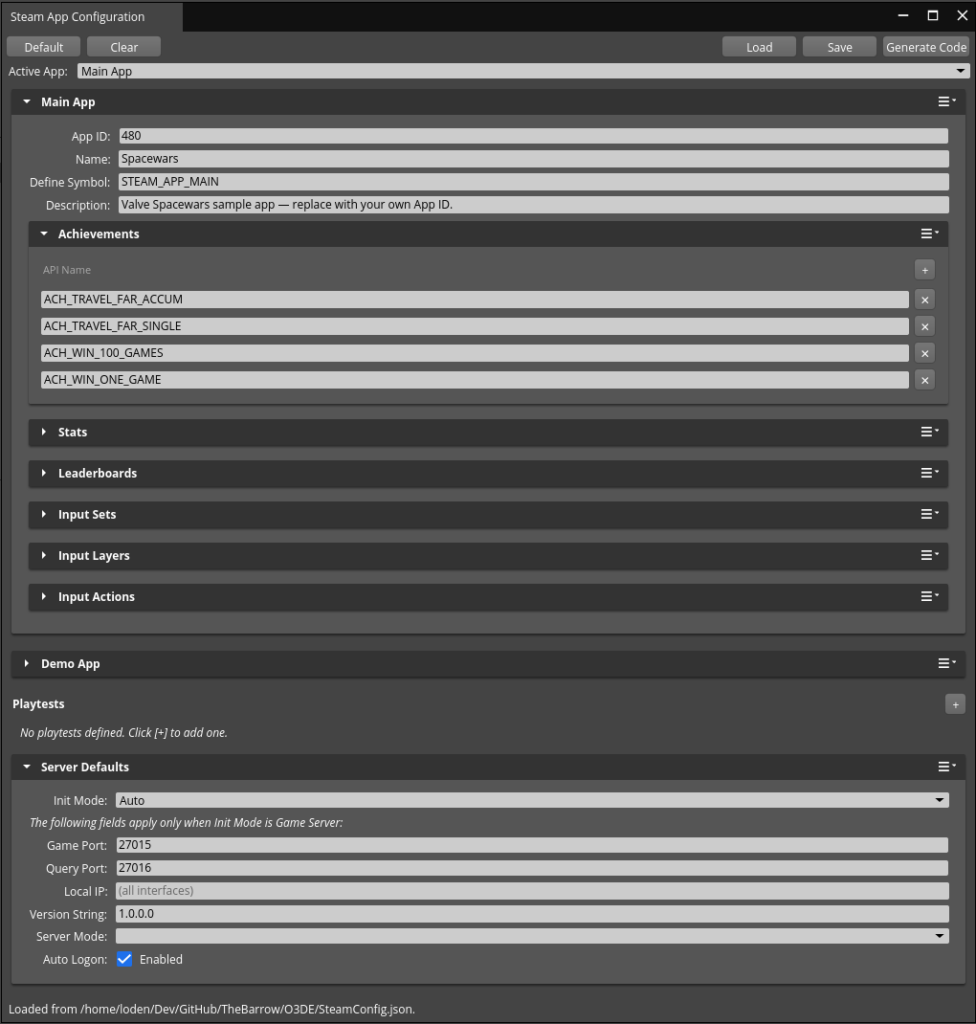
An editor panel (Tools > Heathen Tools Tools > Steam App Configuration) lets you define your game’s Steam artifacts (achievements, stats, leaderboards, input actions) by their Steamworks API names, then generates a typed C++ wrapper (SteamToolsGame) with named, type-safe access to every artifact, no magic strings.
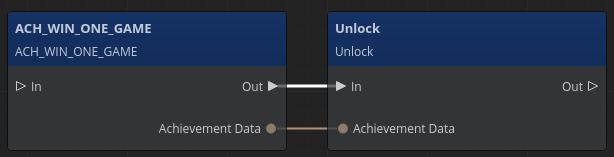
This enables access to your app’s artifacts in Lua and Script Canvas. This feature alone will save countless hours from simple human errors such as miss typing an API name or exposing custom C++ components to tie in with your scripted game logic.
Want the no-code experience? #
Get Access Now to get Toolkit for Steamworks, which brings the same no-code-first Steam integration as the Unity and Unreal implementations of our toolkit to O3DE.