Available for free on Codeberg!
Introduction #
A lightweight, hierarchical tagging system for Open 3D Engine (O3DE) that lets you define, query, and modify game states with deterministic, high-performance u64 hashes.
What Are Gameplay Tags? #
Gameplay Tags are hierarchical, dot-separated strings (e.g., "Effects.Buff.Strength", "Status.Burning") that are hashed into u64 values at build or runtime. This design offers several key advantages:
- Zero Runtime String Cost: After registration, tags are stored as u64 hashes, eliminating string comparison overhead.
- Hierarchical Relationships: Tags automatically inherit parent-child relationships. For example,
"Effects.Buff.Strength"is a descendant of both"Effects.Buff"and"Effects". - Cross-Platform Consistency: The same tag always resolves to the same hash, ensuring reliable behaviour across Windows, Linux, macOS, Android, and iOS.
- Reflection Support: Fully integrated with O3DE’s Script Canvas and Lua, making tags accessible to designers and engineers alike.
Core Features #
The Gameplay Tags Foundation Gem provides everything you need to start using tags in your O3DE projects:
Tag Registration and Management #
Define tags in .gptags files (simple JSON format) and let the Gameplay Tag Binary Builder compile them into optimised .tagbin files. At runtime, tags are loaded into a global registry, making them available for queries and operations.
The Gameplay Tags Editor (available under Heathen Tools in the O3DE Editor) provides a visual interface for managing tags across your project. Features include:
- Tree view of the tag hierarchy
- Duplicate tag detection
- File system watching with auto-reload
- Toggleable registration for draft files
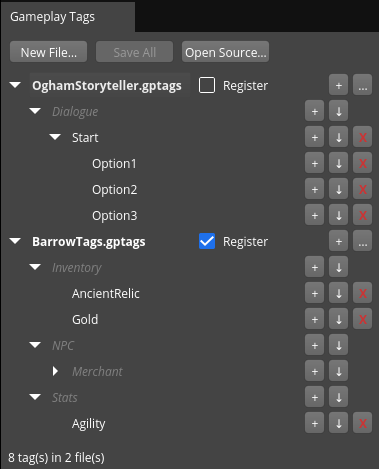
Example .gptags file:
{
  "registered": true,
  "tags": [
    "Effects",
    "Effects.Buff",
    "Effects.Buff.Strength",
    "Effects.Buff.Speed",
    "Status",
    "Status.Burning"
  ]
}
Hierarchical Queries #
Check if a tag is a descendant of another, or query entire branches of the tag hierarchy. This is perfect for systems like buff/debuff management or AI state tracking.
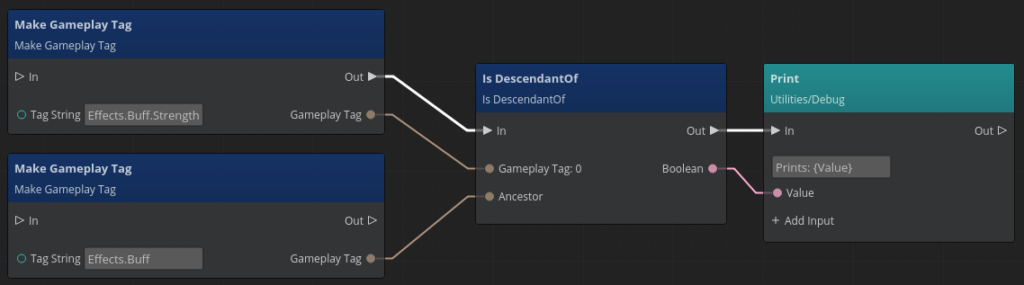
Heathen::GameplayTag buffStrength = Heathen::GameplayTag::Make("Effects.Buff.Strength");
Heathen::GameplayTag buff = Heathen::GameplayTag::Make("Effects.Buff");

bool isDescendant = buffStrength.IsDescendantOf(buff); // Returns true
Tag Collections #
Store and manipulate sets of tags with numeric values (e.g., for stacking buffs). Collections support set operations like union, intersection, and difference, as well as arithmetic operations (add, subtract, multiply, etc.).
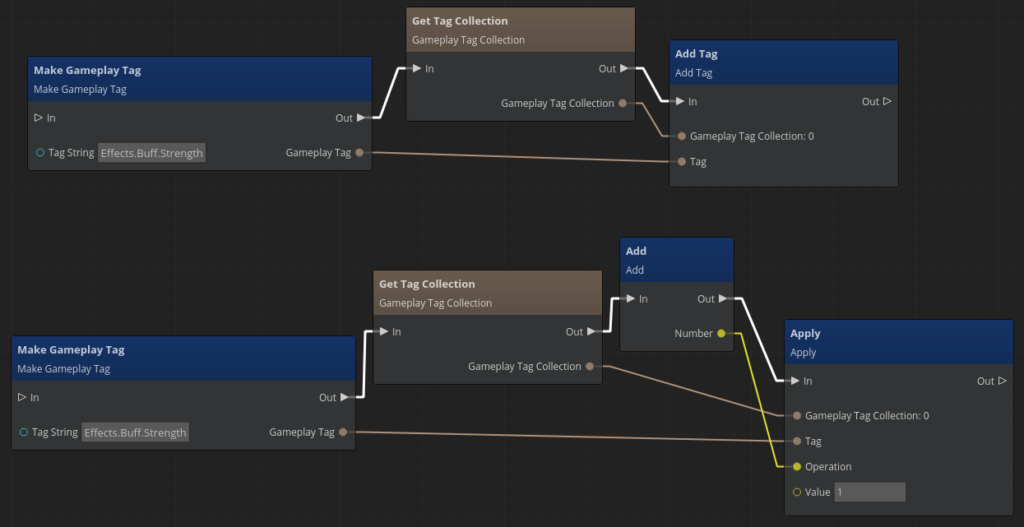
Heathen::GameplayTagCollection activeEffects;
activeEffects.AddTag(Heathen::GameplayTag::Make("Effects.Buff.Strength"));
activeEffects.Apply(Heathen::GameplayTag::Make("Effects.Buff.Strength"),
                    Heathen::GameplayTagArithmetic::Add,
                    2); // Increases the Strength buff stack by 2
Conditions and Operations #
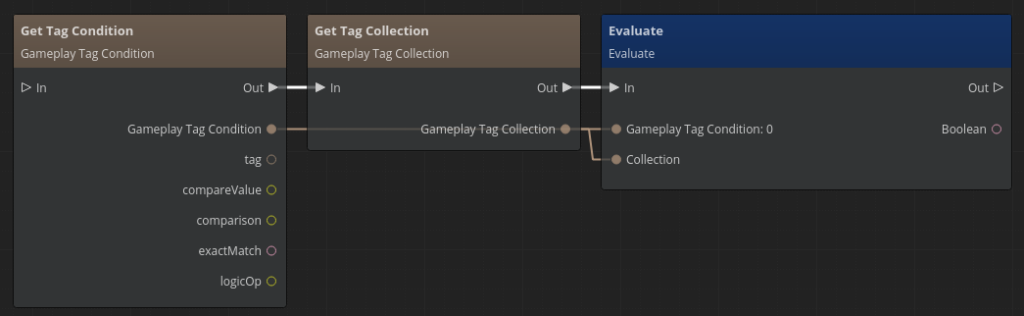
Define conditions (e.g., “Does the player have the Status.Burning tag?”) and operations (e.g., “Add 5 to World.PlayerReputation“) to drive game logic. These are fully exposed to Script Canvas and Lua, so designers can build complex behaviours without touching C++.
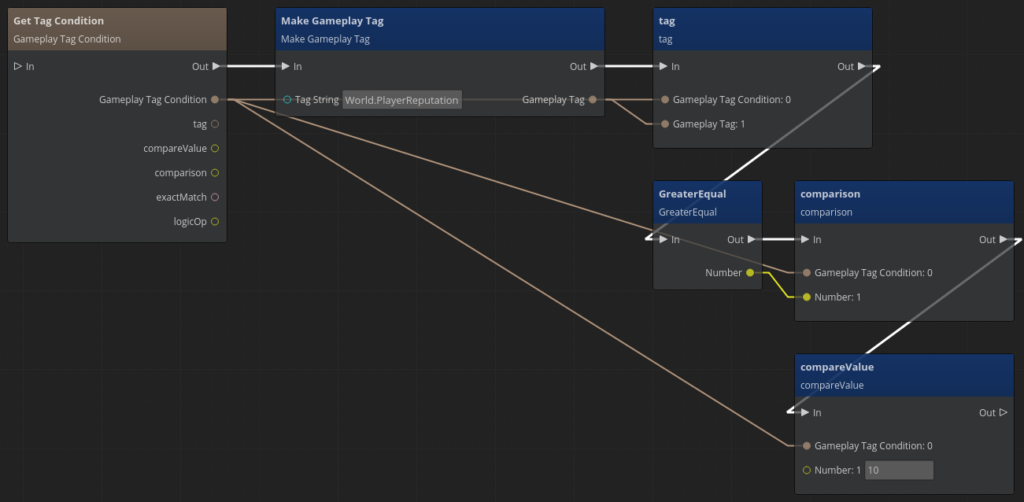
Heathen::GameplayTagCondition repCheck;
repCheck.tag = Heathen::GameplayTag::Make("World.PlayerReputation");
repCheck.comparison = Heathen::GameplayTagComparisonOp::GreaterEqual;
repCheck.compareValue = 10;

bool hasHighReputation = repCheck.Evaluate(playerTags);
Use Examples #
Gameplay Tags are the backbone of several of our O3DE systems:
Gameplay Abilities (Coming Soon!) #
Our upcoming Gameplay Ability System will use tags to define abilities, cooldowns, and interactions. For example:
"Abilities.Fireball"could require the tag"Status.Casting"and apply"Effects.Damage.Fire"to targets.- Tags like
"Abilities.OnCooldown"can block ability activation until the cooldown expires.
Lexicon Localisation #
In our Lexicon Localisation system, tags categorise and manage localised strings. For example:
"Dialogue.NPC.Greeting"might have different translations for each language, with tags ensuring the correct string is selected based on game state.
Ogham Storyteller #
Our Ogham Storyteller tool uses tags to track narrative states and drive branching dialogue. For example:
- A tag like
"Quest.Main.Chapter2.Started"could unlock new dialogue options. - Conditions like
"HasTag(Quest.Main.Chapter1.Completed)"ensure players meet prerequisites before advancing.