
Introduction #
https://partner.steamgames.com/doc/features/voice
Steam Voice helps you record voice data from the local user and prepare it for sending. It also helps you consume that data and play it back.
Steam Voice does not deal with the sending of data. How you choose to send data from one user to another is a matter of how you handle networking in your game. Steam does provide networking tools or you can use any other networking solution you might like.
Examples #
Get Voice Data #
Steamworks SDK provides an easy to use means to get compressed voice data. Note that this is a bare bones simple solution its not designed to compete with duty build Voice solutions its meant to be an easy to use, no-cost option.
Code Free
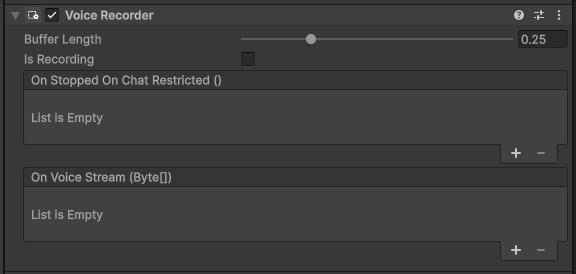
Buffer Length
The amount of recording time to cash before raising Voice Stream with the data. You generally want to keep this as low as possible but it can be useful for smoothing out clips due to slow tick rates.
Is Recording
True when system is recording, false when its not. This is how you start and stop recording of player audio.
On Stopped On Chat Restricted
Occurs when the Voice Result Restricted EVoiceResult is received from the Steamworks API.
On Voice Stream
Occurs every frame (considering buffer) when the Steamworks API has a voice stream payload from the user.
Send Voice Data #
This is largely up to you to do, you would typically send Voice Data over a remote procedure call or similar from the client to the server, and then have the server send it back down to all clients. The specifics of this will depend on your game entirely.
Play Voice Data #
Code Free
Use the Voice Stream to play audio data back.
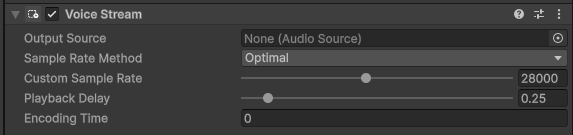
when you receive the byte[] of voice data send to you, call Play Voice Data providing that byte[] to it for playback.

Output Source
The Audio Source that will play the audio back, you can of course make this a 3D source connected to the player’s avatar to accomplish “proximity” chat
Sample Rate Method
How the sample rate is calculated, in general you should use “Optimal” which is the value determined by Steam.
Custom Sample Rate
If your method is set to custom this is the rate that will be used.
Playback Delay
How long after receiving data should the system “buffer” before it starts playback. You will want this to be as low as possible but of course it will need to be greater than your server’s tick rate.
Encoding Time
This is a debug helper and displays the amount of time in milliseconds that are currently encoded and waiting playback. It is updated each tick data is received.